.jpeg)
How to Switch Managed IT Providers Without Disrupting Your Business
Learn how to switch managed IT providers without creating unnecessary downtime, access issues, documentation gaps, or business disruption.
Many businesses know when their IT provider is no longer the right fit. Support is slow. The same issues keep coming back. Documentation is missing. Cybersecurity feels unclear.
Still, switching feels risky.
What if passwords are missing? What if systems go down during the transition? What if employees do not know who to contact?
Those concerns are valid. But staying with the wrong provider carries its own risk. According to Datto's SMB research, 78% of small businesses say a single hour of downtime costs them more than $10,000. A reactive provider that never solves root problems is not a neutral choice — it is an ongoing expense.
What are the signs you may need a new IT provider?
A business may need a new managed IT provider when support is reactive, communication is poor, or the provider is not helping the company plan ahead. Common signs include slow or inconsistent support, recurring issues that never get resolved, poor documentation, limited cybersecurity guidance, unclear billing, and little understanding of how the business actually operates.
If your provider only responds after something breaks, your business is not getting the accountability it needs.
What should you gather before switching?
Before switching, pull together the information your new provider will need. The most critical items are admin credentials for Microsoft 365 or Google Workspace, domain registrar access, firewall and server login information, and backup system ownership details. These four areas create the most risk during a transition if they are unclear or held by the outgoing provider.
Beyond those, also gather current contract terms and renewal dates, software and licensing details, vendor contacts, hardware inventory, and recent support ticket history.
You may not have everything on that list — that is common. A strong incoming provider should be able to identify documentation gaps and rebuild what is missing during onboarding.
What does a clean MSP transition actually look like?
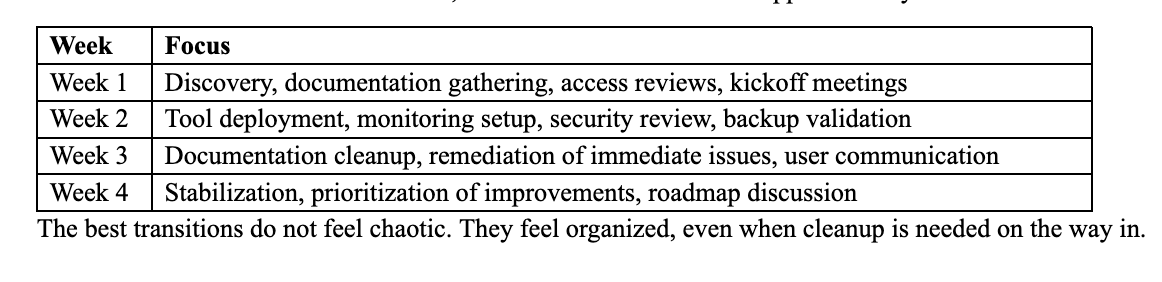
For most small to mid-sized businesses, a structured transition takes approximately four weeks.
Why do access and backups matter most?
Administrative access and backups are the two biggest risk areas in any MSP switch. Your business should know who controls access to Microsoft 365, domain registration, servers, firewalls, backup systems, security tools, and line-of-business applications before the transition begins — not after.
Old provider access should be reviewed and removed once the transition is complete. Backups should be confirmed and tested before the switch closes. A business should never discover during an emergency that backup ownership was unclear.
Can switching providers reveal a staffing gap?
Yes. A transition often surfaces whether the business also has an internal capacity problem — one employee handling too much informal IT work, a migration that needs dedicated ownership, or an internal IT role that needs to be filled. Links Technology supports both managed IT and technical staffing, so Schaumburg-area businesses can evaluate the full picture without starting two separate conversations.
Frequently Asked Questions
How long does it take to switch managed IT providers?
A structured transition typically takes four weeks for most small businesses, covering discovery, tool deployment, documentation cleanup, and stabilization. Rushing the process increases risk; planning it properly reduces it.
What happens to my data and systems during the switch?
A well-run transition keeps systems running throughout. The incoming provider should review access and backups before making any changes, and employee-facing changes should be communicated clearly before they happen.
What if my current provider is uncooperative during the transition?
This is more common than most businesses expect. A strong incoming provider will have experience managing difficult transitions, including situations where documentation is missing, access is withheld, or the outgoing provider is unresponsive.
Bottom Line
Switching managed IT providers does not have to disrupt your business. With the right process, a transition improves documentation, strengthens access control, clarifies backups, and creates a better foundation going forward.
Links Technology Solutions has helped Schaumburg-area businesses transition managed IT support for 25 years, with a structured approach that protects access, cybersecurity, documentation, and continuity from day one.
Concerned about what a transition would actually involve for your environment? That is a five-minute conversation. [Contact Links Technology.]